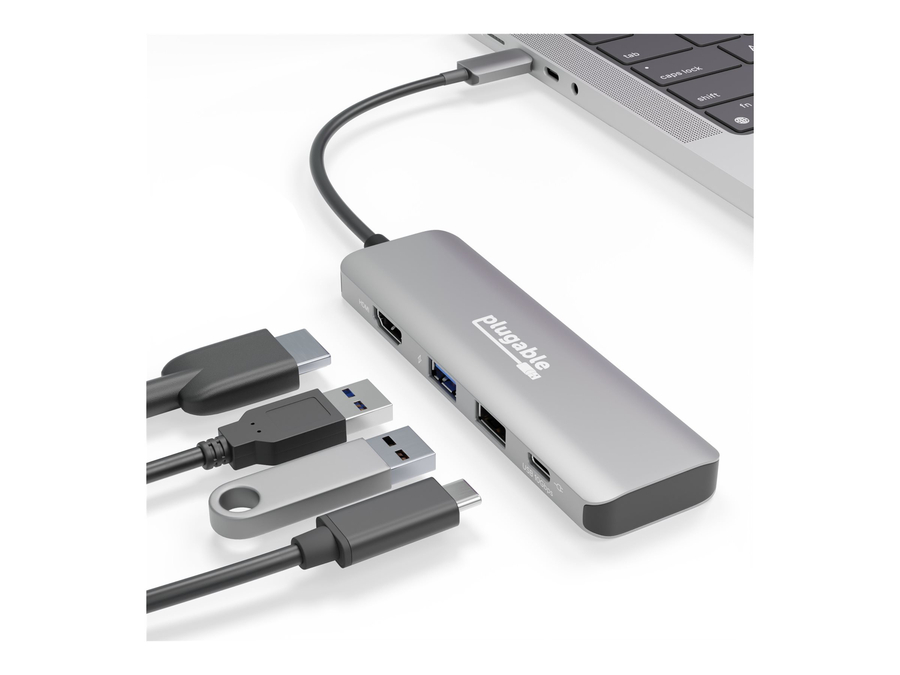
The Reliable Hub That Lets You Do More With LessThrough a single connection, make space for your preferred peripherals. The Plugable 7-in-1 USB-C Hub (USBC-7IN1E) lets you connect an extra 4K HDMI monitor, two USB devices like a mouse and keyboard, wired Gigabit Ethernet, SD or microSD cards, and 87W charging.This compact and ruggedly constructed USB-C hub is engineered to fix the issues most commonly associated with USB hubs. With the latest, updated chipsets, you can expect a more reliable DisplayPort over USB-C signal, which means no more flickering screens. It also means intelligent power handling, which prevents overdrawing power. But most importantly, this hub supports consistency in port functionality so you can use all of the ports at the same time.Charge UpDon’t waste a USB-C port on a charger. The USBC-7IN1E has pass-through charging so you can use all of your peripherals and charge your laptop at the same time, all through one USB-C port.Supports USB-C Power Delivery (PD) input up to 100W and can charge supported systems up to 87W.High Definition DisplayYou’ve got too much to do to be cooped up in a little laptop screen. Stretch out with an HDMI-equipped monitor, T.V., or projector and achieve resolutions up to 3840x2160 @ 30Hz (4K 30Hz).Let’s ConnectTwo USB 3.0 (5Gbps data transfer speeds) ports let you connect anything from keyboards to storage devices.SD and microSD card slots so you can quickly transfer the images and videos on your camera without actually connecting your camera.Gigabit Ethernet port so you can connect to the world even if you can’t connect to the WiFi.
- Provides SuperSpeed USB 3.0 (5 Gbps) link between computer to video, audio, network, and two additional USB 3.0 ports. - Compatible with Windows 10, 8, 7, and XP. Intel/AMD only (no Windows RT/ARM). Not supported for Mac or Linux at this time. - Backwards compatible with USB 2.0 (480Mbps) for both the PC and attached devices. - HDMI and DVI/VGA ports for two external monitors supports display resolutions up to 2560×1440 (HDMI) and DVI / VGA to 2048×1152 / 1920×1200. - 2560×1440 output only available when using a single HDMI display connected through the dock. See additional details relating to 2560×1440 functionality in the FAQ below. - Network port offers wired Gigabit Ethernet connectivity (also 10/100 capable). - Graphics, audio, and networking all managed by single DisplayLink DL-3900 chipset. - USB 3.0 ports and components controlled by VIA VL811 chipset; four USB 2.0 ports controlled by Terminus chipset. - Stereo audio in/out with hotplug detection. - Comes with four-amp AC power adapter, USB 3.0 Type-A male to Type-B male cable, and DVI-to-VGA passive port adapter. Connect up to 10 accessories to your Windows PC through a single SuperSpeed USB 3.0 port with the Plugable UD-3900, a universal docking station for Windows-based computers that offers the speed, performance, and reliability found in proprietary docking stations for specific laptop PC brands. With graphics, networking, and hub chipsets that have been selected and tested together to ensure maximum quality, the UD-3900 provides: An HDMI and a DVI port for connecting two external monitors and supports resolutions up to 2560×1440* (HDMI) and DVI / VGA to 2048×1152 / 1920×1200 (DVI-to-VGA adapter also included) - An RJ-45 Gigabit Ethernet network port (also supports 10/100 Ethernet) - External speaker output jack and a microphone line in - Two USB 3.0 ports for accessories (such as an external hard drive or another graphics port) - Four USB 2.0 ports (great for a keyboard and mouse with two ports to spare) Speed and Power UD-3000 frontal viewPerformance is best when hooking up the UD-3900 docking station to a USB 3.0 port on a PC, allowing SuperSpeed data-transfer rates of up to five gigabits per second between the computer and the dock’s USB 3.0 components and ports. Play full-motion video in 1080p on the monitors attached to the dock’s video ports. Access your Gigabit Ethernet network through the dock’s network adapter without bottlenecks. Open files in lightning-fast time on external drives connected to the docking station’s USB 3.0 ports. The UD-3900 also can be connected to a computer’s USB 2.0 port, though communications between the computer and the docking station will be no faster than the USB 2.0 maximum of 480 megabits per second. The UD-3900’s four-amp power supply provides current for attaching bus-powered devices to the spare USB 2.0 and 3.0 ports, like flash drives or additional USB graphics adapters. However, the unit is not a charging hub. It has no functionality for recharging iPads, iPods, other tablets, or smartphones via its USB ports. The dock will wake along with your PC from suspend and hibernation modes. Integrated Chipsets The heart of the docking station is its DisplayLink DL-3900 chipset, which manages dual graphics and audio output and Gigabit Ethernet functions. The integration of these functions on a single chipset means fewer internal components need to be bolted together, leading to increased compatibility and reliability overall. Drivers are installed automatically from Windows Update if an Internet connection is present when the docking station is first connected (a drivers CD also comes in the box). You can extend or mirror your primary Windows desktop to a monitor connected to the UD-3900. With DisplayLink technology, graphics processing still is handled by connected computer’s central processor and graphics processor. The DisplayLink drivers on that PC compress and transmit pixels to the DL-3900 chipset, which decodes the data and displays it. The UD-3900 can be used in conjunction with any of Plugable’s other USB graphics adapters for adding extra monitors. Please note that USB graphics adapters not powered by DisplayLink technology cannot be used on your PC simultaneously with the UD-3900. Drivers for non-DisplayLink USB graphics adapters must be uninstalled from the PC. The internal USB 3.0 components and two extra ports are managed by a VIA VL811 chipset, while the USB 2.0 controller chipset for the four USB 3.0 ports comes from Terminus Technology. USB 3.0 devices must be connected to USB 3.0 ports for proper functionality, but USB 2.0/1.1 devices can be connected to any of the six USB ports. What’s in the Box The Plugable UD-3900 comes with a four-amp, five-volt power supply; a USB 3.0 Type-A male to Type-B male cable; a passive DVI-to-VGA port adapter; a quick-install guide; and a drivers CD. Resolutions Supported The hardware is capable of supporting nearly arbitrary resolutions, up to its limit of 2560x1440 (HDMI) / 1920x1200 (DVI). VESA standard and widescreen resolutions are supported by most software, including: 2560x1440 (HDMI Only), 1920×1080, 1600×1200, 1680×1050, 1440×900. 1400×1050, 1280×1024, 1280×768, 1280×720, 1152×864, 1024×768, 800×600, 640×480. For all supported resolutions (other than 2560x1440 which has a 50Hz refresh rate), the display is refreshed at 60Hz, and the hardware is capable of 16, and 32bpp color depths. Some operating systems require specific depths, like 32bpp for Windows Aero support. Hardware Requirements Dual Core Intel or AMD CPU, 2GHz or better. Windows GPU should be Intel, AMD, or Nvidia. Operating System and Driver Details WINDOWS VERSION COMPATIBILITY: Drivers can be installed automatically via Windows Update with support for Windows 10, 8, 7, and XP. Not compatible with ARM-based Windows RT/Surface RT. Note that Microsoft limits multiple display support in Windows 7 “Starter” Edition to mirroring screens. Even though drivers are provided automatically, we recommend visiting the Plugable driver webpage for the most recent drivers and other information. DisplayLink's Windows drivers make use of the main GPU for rendering, and require an Intel, nVidia, ATI/AMD primary graphics driver supporting WDDM to be installed. Most systems since Windows 7 satisfy this requirement. Different USB graphics driver types (DisplayLink, MCT/Tritton, SMSC, Fresco) are not compatible on the same system. In particular, some versions of MCT drivers will bluescreen when other USB graphics drivers are also present. Uninstall other USB graphics driver types before switching types, and stay with a single type (e.g. DisplayLink based) on a single system. MAC COMPATIBILITY: Mac is not supported due to significant limitations in the operating system. LINUX COMPATIBILITY: Linux is not supported for this device. TOUCHSCREEN COMPATIBILITY: Some touchscreens are compatible, it is dependent upon whether the touchscreen monitor software supports multiple monitor setups. Please contact your monitor manufacturer to determine if multiple monitor setups are supported. HDMI TV Compatibility The docking station supports HDMI through the 1.3 standard. To use a TV as a monitor via the dock, the TV must support EDID, the extended display identification standard for communicating monitor capabilities to a PC. Many TVs that have a VGA port in addition to an HDMI port assume that computers will use VGA for connectivity rather than HDMI. In these cases, a VGA connection from the PC’s internal video card to the TV might provide the best results. HDCP protected content not supported. Performance Tuning If you’re experiencing slowness or latency on your UD-3900 connected display: - Make sure your adapter is connected to a USB 3.0 port (if available) on your computer. - If USB 3.0 is not available, play 3D games and videos on a display that isn’t connected via USB. - When all else fails, reduce your USB-connected monitor’s screen resolution via the Windows display control panel. By reducing the amount of data that needs to be compressed and sent over USB, you’ll increase responsiveness. Gaming USB graphics devices, like the UD-3900, are "virtual" devices where much of the heavy lifting is done by the CPU, by hooking into the graphics stack. The DirectX APIs used by games assume direct hardware access (a PCIe graphics card). DisplayLink's drivers attempt to emulate as much of the functionality as possible, which is why some 3D functionality (like that needed for desktop and apps) works. We don't recommend running games with USB graphics, because this emulation cannot be perfect. And even without specific compatibility problems, performance will always be a challenge - the extra CPU work required for USB graphics will be a source of reduced frame rates and problems. Normal desktop and application use are fine because they don't push the system as hard as 3D games do. Common problems experienced when trying to run a game on a USB graphics adapter include: - Games not launching - Games crashing - Screen flickering - Screen going black
Performs Like a Docking Station. Built Like a Hub.Is it a hub or something more? The 11-in-1 Hub from Plugable is packed with the features you’d expect from a docking station. Features like 100W USB-C pass-through charging, dual 4K 60Hz-capable HDMI ports, 3x USB 3.0 (5Gpbs) ports, a USB-C (5Gpbs) port, SD and microSD card slots, and a 3.5mm audio port. Heck, it even has Gigabit Ethernet (1Gbps) because you can’t always count on the wifi around here.Despite being flush with features, it’s still small enough to toss in your bag and take it to-go. Perfect for commuting to and from a hybrid office.Dual 4K for WindowsThere’s work to be done, and that laptop screen isn’t the place to do it. A USB C hub HDMI port is fairly common, but two? Featuring dual HDMI ports, this handy hub lets you stretch out across two ultra-high-definition screens with resolutions up to 4K 60Hz on Windows and Chrome computers.On Mac computers, extend to one 4K 60Hz display with this USB C Hub Multiport Adapter. A screen connected to the second HDMI port will mirror the first HDMI port.Host computer must support DP 1.4 and Multi-Stream Transport (MST) to achieve dual 4K 60Hz.100W Pass-Through ChargingA USB hub powered by your laptop, or your laptop’s USB-C power adapter.The USB-C hub has pass-through charging so you can use your laptop's USB-C Power Adapter to power the hub and your computer. Hub also works in bus-powered mode (no USB-C power adapter connected).Supports USB-C Power Delivery (PD) input up to 100W, with 8-15W intelligently reserved for the hub and your peripherals.Keep It on Your Desk or Take It to GoPower meets portability in this USB C Hub Multiport Adapter. Designed to be semi-permanent, the hub feels comfortable as a permanent desk accessory with a minimal footprint, or as a traveling companion when commuting to a hybrid office.Rigid and compact aluminum construction keeps all of your ports accessible and stands up to wear and tear. No dedicated power adapter (the hub uses your laptop’s USB-C charger) means less cord clutter.
Expand Your USB-C or Thunderbolt 3 LaptopConnect your essential workstation peripherals to your laptop with a single, compact USB-C hub. The Plugable 7-in-1 USB-C Hub (USBC-7IN1) is the perfect companion to connect an external 4K HDMI monitor, USB peripherals like a mouse, keyboard and flash drive, SD or microSD cards, and provide power to the laptop all through a single USB-C connection back to your laptop.Optimized through extensive testing and years of product development, the multiport adapter was designed by Plugable to fix the problems most commonly mentioned by real customers. Building on the latest technology, the USB-C 7-in-1 hub provides a more reliable DisplayPort over USB-C connection, consistency in port functionality, less risk of overdrawing power, and protecting the laptop when using pass-through charging.r to the laptop all through a single USB-C connection back to your laptop.Optimized through extensive testing and years of product development, the multiport adapter was designed by Plugable to fix the problems most commonly mentioned by real customers. Building on the latest technology, the USB-C 7-in-1 hub provides a more reliable DisplayPort over USB-C connection, consistency in port functionality, less risk of overdrawing power, and protecting the laptop when using pass-through charging.Stay ChargedDon’t give up your only USB-C port to your laptop charger. The included USB-C charging port will keep your laptop charged, while using the other hub’s ports at the same time. Supports USB-C power delivery input up to 100W and can charge supported systems up to 87W.USB-C power adapter not included. 7.5W of charging capacity to power hub and attached USB devicesHigh Definition DisplayConnect your HDMI-equipped monitor, television or projector to your laptop and achieve resolutions up to 3840x2160 @ 30Hz (4K 30Hz).Other popular supported resolutions include 3440x1440, 2560x1440, 1920x1200, 1920x1080 and lower.Connect your DevicesEquipped with three USB 3.0 (5Gbps data transfer speeds) ports and an SD and microSD card slot in order to connect must-have peripherals and storage devices to keep your work in sync.The USB 3.0 ports are backwards compatible with USB 2.0 devices.Stay ChargedDon’t give up your only USB-C port to your laptop charger. The included USB-C charging port will keep your laptop charged, while using the other hub’s ports at the same time. Supports USB-C power delivery input up to 100W and can charge supported systems up to 87W.USB-C power adapter not included. 7.5W of charging capacity to power hub and attached USB devices.High Definition DisplayConnect your HDMI-equipped monitor, television or projector to your laptop and achieve resolutions up to 3840x2160 @ 30Hz (4K 30Hz).Other popular supported resolutions include 3440x1440, 2560x1440, 1920x1200, 1920x1080 and lower.Note: This hub will not work with DisplayPort monitors.Connect your DevicesEquipped with three USB 3.0 (5Gbps data transfer speeds) ports and an SD and microSD card slot in order to connect must-have peripherals and storage devices to keep your work in sync.The USB 3.0 ports are backwards compatible with USB 2.0 devices.
Expand Your WorkstationDesigned for those who want a one-stop upgrade for your USB 3.0 or USB-C laptop. The Plugable USB 3.0 Dual HDMI Laptop Docking Station for Windows (UD-3900Z) allows you to add dual HDMI monitors, and connect your peripherals, all through a single cable back to your laptop. Quickly come and go from your desk with ease. By connecting one cable to your laptop, you gain 10 extra ports of connectivity, making it easier to do more work in less time. Power users with dual monitors: The UD-3900Z is the dock you need to maximize your productivity and your workspace. Great for business uses such as email, web applications, Microsoft office, and more. Featuring a vertical design, you can easily slip this dock between your monitors and save valuable desk space. Conveniently access the front USB and audio port for those devices you plug and unplug everyday. Note: This dock will not charge your laptop and will need your external charger to provide power to your system. This dock has two HDMI ports (not compatible with DisplayPort displays).High-Resolution DisplaysGet more screen space for more productivity. High resolution HDMI displays will change the way you manage your out of control tabs and your workflow. No more grainy visuals and tiny screens. Watch videos on clear and sharp 2K 60Hz screens (1920x1200 @ 60Hz). Expand your screen real estate with this dock and cut down the time it takes to work on those highly productive tasks.Dynamic DesignNot only does this dock expand your connectivity, it also brings a whole new level of performance and flexibility. Featuring DisplayLink graphic technology, you can connect this dock to a USB 3.0 Windows laptop. So whether you're hoteling at a desk for work, or sharing your dock at home, this dock provides the flexibility you need. The vertical orientation is designed to reduce its desk footprint to give you more room for the things that matter most. With easily accessible ports on the front of the dock, you can unplug your headphones with ease.
Add Gigabit Ethernet and three USB 3.0 ports to almost any laptop with the Plugable Bus-Powered 3-Port USB 3.0 Hub With Gigabit Ethernet (USB3-HUB3ME). Whether your computer has USB-A ports, or newer USB-C ports, this plug and play adapter makes it easy to use a wired network and connect more devices. This hub is the perfect travel companion for any laptop due to its small size and USB bus powered design removing the need for a bulky power adapter to operate.Common UsesThe Plugable USB3-HUB3ME is a simple solution for adding an Ethernet connection to your laptop, ultrabook, and notebook or upgrading your network adapter in your desktop PC. You can also add additional network interfaces and transfer files peer-to-peer over the hub’s wired Gigabit Ethernet network. With three additional USB 3.0 ports, get the connectivity you need. Increase your productivity by adding a flash drive, keyboard, and mouse. Please note that this product is not a solution for connecting a USB device like a printer to a network. Compatible with Apple computers (MacBook Retina, MacBook Pro, MacBook Air), Microsoft Surface series (Surface Pro, Surface Book, Surface Laptop, Surface Go), Dell XPS/Inspiron/Vostro, Chromebooks, and more. Perfect for travelers that need to access a wired network for security, businesses that have a mix of USB 3.0 and USB-C systems, and for anyone that needs the perfect companion to increase their connectivity.Design and PerformanceThis hub features a sleek, sturdy, and compact black aluminum design perfect for travel and small work spaces. The hub’s LEDs indicate Ethernet diagnostics and USB connectivity. It also features intelligently placed USB ports that ensure all of your devices plug in without interfering with each other. Nobody likes a flaky WiFi connection with videos constantly buffering, or laggy connections to multiplayer game servers. A wired network connection can help the flow of data to remain constant, and improve transfer rates. The USB3-HUB3ME can improve speeds compared to most wireless networks. Plug into any laptop or desktop limited to 10/100 Ethernet or no Ethernet at all to benefit from faster transfers on your Gigabit Ethernet network. The hub also works on 10/100 Ethernet networks at their native speeds. USB 3.0 systems support theoretical maximum transfer speeds up to 5Gbps and USB 2.0 supports up to 480Mbps. In practice, most machines will double in network speeds by moving from a 100Mbps Fast Ethernet to a 1000Mbps Gigabit Ethernet via USB 2.0, and could see more than twice that gain on USB 3.0.
New and Improved Triple Display DockInstantly turn your laptop, 2-in-1, or Windows tablet into a multi-monitor desktop—by connecting a single cable—with the Plugable Triple HDMI USB-C Docking Station (UD-3900PDZ). The Plugable UD-3900PDZ Docking Station connects to a supported system using the included USB-C cable and provides the ability to connect up to three additional HDMI displays, provide up to 60W of USB-C Power Delivery, six USB 3.0 ports, a wired Gigabit Ethernet port, and 3.5mm combination analog audio input/output jack. Utilizing innovations introduced with USB 3.1, this dock takes advantage of "Alternate Modes" from the USB-C specifications for one of the display outputs and host charging. This new and improved DisplayLink dock has been designed from the inside out to provide a triple-display dock that people can rely on. Lots of triple-display docks on the market have issues with monitors losing connection, the dock rebooting, flickering, and more. This new dock represents our focus on quality and our 10+ years in the docking station market. This new design has evidence of quality from its chipsets, layouts, high-tier manufacturing, and extensive testing. Note: New and innovative products aren't without compatibility concerns, it is important to read the information below for details regarding display output types and system requirements. USB-C is required for this docking station, it will not work properly when adapted to USB 3.0. When attached to a fully compatible USB-C or Thunderbolt 3 system, the UD-3900PDZ supports Windows 11, 10, 8.x, and 7 and macOS 10.14+. Chrome OS, Linux are not supported.
Plugable’s USB-C Triple 4K Docking Station Gives You Access to three 4K Screens—All Through a Single USB-C PortMore than just a chance to expand your screen count, the UD-6950PDZ also makes room for all of your peripherals. Through a single USB-C connection back to the host, get six USB-A 5Gbps ports, Gigabit Ethernet, a combination audio input/output port, and of course, 60W charging so you can leave your charger in the bag.HDMI, DisplayPort, or BothThree HDMI monitors, three DisplayPort Monitors, or a combination of both. The Plugable USB-C Triple 4K HDMI and DisplayPort Docking Station (UD-6950PDZ) offers three 4K HDMI Ports, and three 4K DisplayPort ports so you can mix and match up to three monitors—no adapters necessary. Of course, the UD-6950PDZ lets you connect more than screens. With an Ethernet port, an audio jack, and six USB-A ports, this USB-C Docking Station has room to pair all of your peripherals with a single connection back to your computer.A Powerful PerformerWith the UD-6950PDZ, you’re not just adding screens, you’re also getting a whole host of extra ports. Starting with the innovative display array, you can add up to three 4K displays at 60Hz in any configuration of HDMI and/or DisplayPort to USB4 / Thunderbolt 4 hosts via Alt Mode. For computers that only support one display, the UD-6950PDZ laptop dock has you covered with DisplayLink technology. Just a heads up, you’ll need to download a DisplayLink driver to get full functionality.Will It Charge My LaptopThe UD-6950PDZ provides 60W charging to laptops that support PowerDelivery. You’ll want to take a look at your laptop’s power requirements. If it came with a USB-C power cord, the docking station can provide up to 60W to power the computer, replacing a manufacturer's USB-C power supply rated up to 65W. If your laptop supports a higher charging rate, you may still need to use the laptop’s power cord.
Expand Your WorkstationDesigned for those who want a one-stop upgrade for your USB 3.0 laptop. The Plugable USB 3.0 Universal Laptop Horizontal Docking Station for Windows (UD-3900H) allows you to add dual monitors, and connect your peripherals, all through a single cable back to your laptop. Quickly come and go from your desk with ease. By connecting one cable to your laptop, you gain 11 extra ports of connectivity, making it easier to do more work in less time.Power users with dual monitors: The UD-3900H is the dock you need to maximize your productivity and your workspace. Great for business uses such as email, web applications, Microsoft office, and more. Featuring a vertical design, you can easily slip this dock between your monitors and save valuable desk space. Conveniently access the front USB and audio ports for those devices you plug and unplug everyday.Note: The UD-3900H will not charge your laptop and will need your external charger to provide power to your system. The UD-3900H has one HDMI port and one DVI port and we include both a DVI to VGA adapter and a DVI to HDMI adapter if needed (not compatible with DisplayPort displays). This docking station also includes both USB 3.0 and USB-C cables for compatibility with the widest range of systems.High-Resolution DisplaysGet more screen space for more productivity. High resolution displays (HDMI, DVI or VGA) will change the way you manage your out of control tabs and your workflow.No more grainy visuals and tiny screens. Watch videos on clear and sharp 2K 60Hz screens (1920x1200 @ 60Hz). Expand your screen real estate with this dock and cut down the time it takes to work on those highly productive tasks.Dynamic DesignNot only does this dock expand your connectivity, it also brings a whole new level of performance and flexibility.Featuring DisplayLink graphic technology, you can connect this dock to a USB 3.0 Windows laptop. So whether you're hoteling at a desk for work, or sharing your dock at home, this dock provides the flexibility you need.The horizontal orientation is designed to fit under the edge of your display and to give you more room on your desk for the things that matter most. With easily accessible ports on the side of the dock, you can plug and unplug your headphones with ease.
Expand Your WorkstationDesigned for those who want a one-stop upgrade for your USB 3.0 or USB-C laptop. The Plugable USB 3.0 Dual 4K Docking Station (UD-6950Z) allows you to add dual displays, using DisplayPort or HDMI, and connect your peripherals, all through a single cable back to your laptop. Quickly come and go from your desk with ease. By connecting many devices with just one cable to your laptop, you gain 10 extra ports of connectivity, making it easier to do more work in less time.Power users with dual 4K monitors: The UD-6950Z is the dock you need to maximize your productivity and your workspace. Great for business uses such as email, web applications, Microsoft office, and more. Featuring a vertical design, you can easily slip this dock under your monitor and save valuable desk space. Conveniently access the front USB and audio ports for those devices you plug and unplug everyday.Note: This dock will not charge your laptop and will need your external charger to provide power to your system. Due to limited USB 3.0 bandwidth and reduced hardware graphics acceleration of the DisplayLink software and hardware used in this docking station we do not recommend it for use with full screen video playback, 2D or 3D graphics applications, or video editing software.High-Resolution DisplaysGet more screen space for more productivity. High resolution displays (DisplayPort or HDMI) will change the way you manage your out of control tabs and your workflow.No more grainy visuals and tiny screens. Expand your screen real estate with this dock and cut down the time it takes to work on those highly productive tasks.Note: To achieve 4K 60Hz each connected monitor and cable must support the desired resolution and refresh rate.Dynamic DesignNot only does this dock expand your connectivity, it also brings a whole new level of performance and flexibility.Featuring DisplayLink graphics technology, you can connect this dock to a USB 3.0 or USB-C laptop. So whether you're hoteling at a desk for work, or sharing your dock at home, this dock provides the flexibility you need.The vertical orientation is designed to reduce its desk footprint to give you more room for the things that matter most. With easily accessible ports on the front of the dock, you can charge your phone and unplug your headphones with ease.
Note: Search results and information may differ as they are provided by a third party.
In Stock*: Product stock is updated from the last business day and can change.
MFR: Netgear, Inc
Qty: 1
Part #: GS105NA